Asana приобретает StackAI — теперь каждый рабочий процесс с участием человека выполняется в одном месте.Подробнее
User research session template
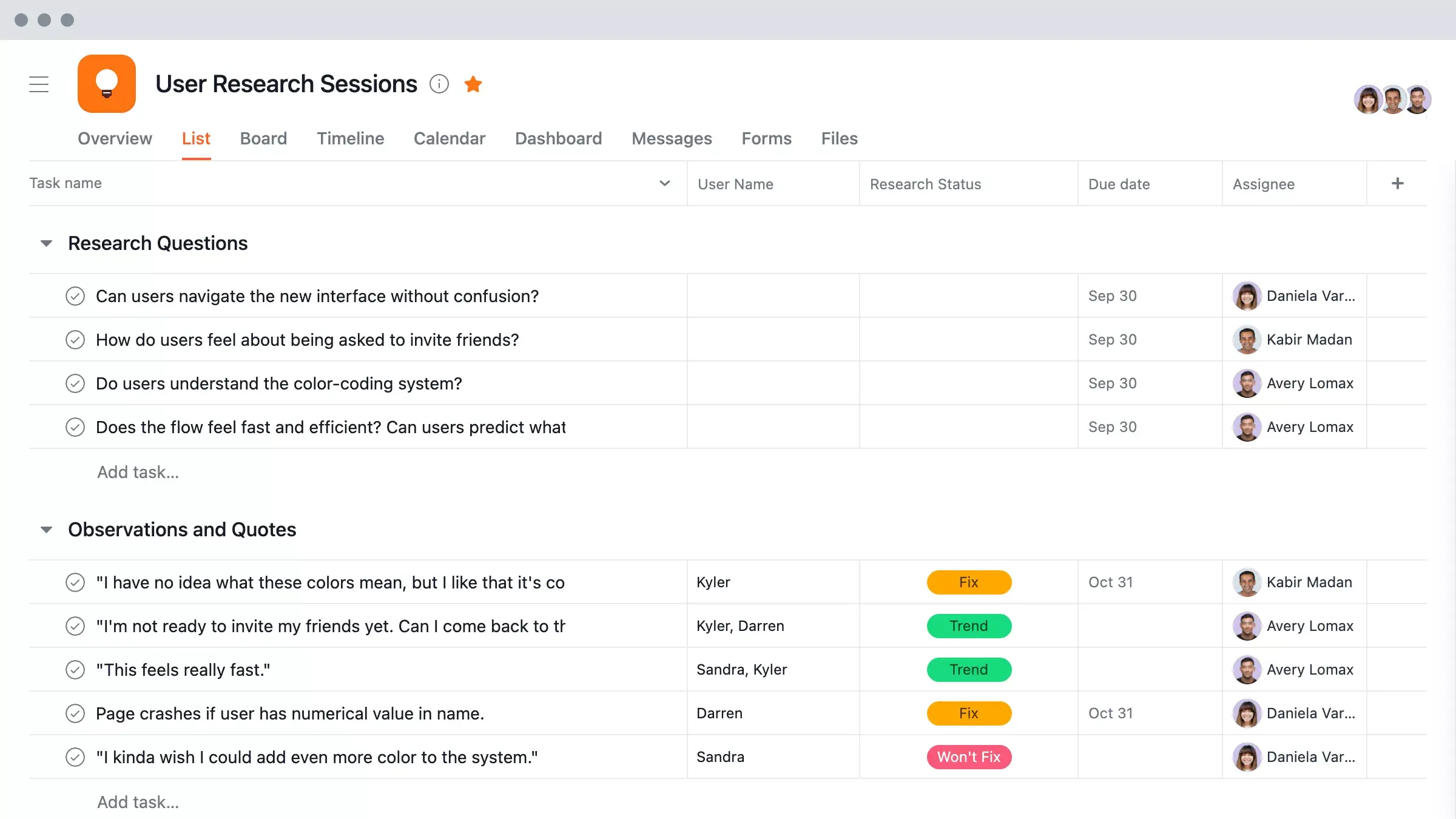
Plan, run, and track usability tests and interviews with Asana's free user research template so your team can capture consistent insights and follow through on next steps.
Use templateSign up to use this template.
ИНТЕГРИРОВАННЫЕ ФУНКЦИИ
Recommended apps


Summary
Usability testing sessions are crucial in helping teams understand their audience and develop products and design solutions that genuinely benefit them. But without a template to store questions, share insights, and assign follow-up tasks, sessions don't have the affect they should. In this article, you'll learn what a user research session template is, why it matters, what to include in yours, and how to turn research insights into meaningful improvements for your product.
Читать: Бесплатный шаблон плана исследования для любой командыWhat is a user research session template?
A user research session template is a reusable document that gives your team a consistent structure for planning, conducting, and documenting usability tests and user interviews. It includes session objectives, discussion questions, observation notes, and follow-up tasks in one place so nothing gets lost between sessions.
Whether you're running usability tests, interviews, or concept evaluations, a template keeps everyone aligned and saves time. Instead of building a new agenda from scratch, you start with a proven format and focus on what matters most: understanding your users.
Бесплатный шаблон для исследований среди пользователейWhy use a user research session template
Running research sessions without a template makes it easy to miss key questions, lose track of insights, or end up with inconsistent data across sessions. A template solves these problems by giving your team a reliable structure to follow every time:
Save time on session prep. Rather than building a new agenda for every session, a template lets you start with a proven structure and adapt it to your specific research questions.
Collect consistent data. When every session follows the same format, it's easier to compare findings across participants and spot patterns in user behavior.
Keep your team aligned. A shared template gives researchers, designers, and product managers a single source of truth for what's being tested, what questions to ask, and what to do with the findings.
Turn insights into action faster. With a built-in section for follow-up tasks and owners, you can make sure research findings lead to real product improvements rather than sitting in a forgotten document.
What to include in your user research session template
A good template covers the full arc of a research session, from preparation to follow-up. Here are the key components to include:
Session objectives: Goals for the research session
Participant details: Name, role, recruitment source, and background
Discussion guide: Questions or tasks in order
Observation notes: Space to record what participants say and do
Key findings: Main takeaways from the session
Follow-up tasks: Next steps, owners, and due dates
Tips to make the most of your usability testing template
To get the most value from your user research sessions, keep these tips in mind:
Make it easy for everyone to follow. Make your agenda easy for testing subjects to follow and ensure your own team stays on track with an interview guide created in advance.
Ensure consistency. Keep each research session consistent by utilizing the same template each time, so you can get a signal on key questions.
Capture and track insights. After completing your session, track, prioritize, and share findings in Asana so you can assign follow-up work to the right people and see trends over time.
How to track and follow up on research insights
The most valuable research session is one that leads to real changes in your product, and that's where a work management tool like Asana makes a difference. Instead of letting insights get buried in spreadsheets or shared docs, you can connect findings directly to the work your team is doing.
With Asana, you can:
Assign follow-up tasks to specific team members so every insight has an owner and a deadline.
Track progress on research-driven work alongside your other projects, giving you full visibility into what's been addressed and what still needs attention.
Share findings across teams so designers, engineers, and product managers all have access to the same research context.
Spot trends over time by organizing insights from multiple sessions in one place, making it easier to prioritize the changes that will have the biggest effect on your users and support continuous improvement.
When your research insights live in the same place as your project work, nothing falls through the cracks. Get started with Asana to bring your research sessions and follow-up work together in one platform.
Бесплатный шаблон для исследований среди пользователейFAQs about user research sessions
How long should a user research session last?
How many participants do I need for user research?
Should I record user research sessions?
What's the difference between user interviews and usability testing?
More features, more organization
The best user research teams keep their ideas and insights organized with Asana.