Asana 收購 StackAI — 現在每個人工代理人的工作流程都在同一處進行。深入瞭解


從新創公司到《財星》百大企業,超過 170,000 個團隊* 信賴 Asana









Asana 與 Jira 相比如何?
功能
為團隊打造的人工智慧
Asana AI 隊友是由 Work Graph 提供支援的 AI 代理,因此他們從第一天起就瞭解您團隊的目標、專案和相依性,且每個 AI 動作都是可查看且可稽核的。 深入瞭解。
400 多項原生整合,用於實現工作相互連結
Asana 提供 400 多項原生、第一方整合,涵蓋 Slack、Microsoft Teams、Google Drive 及 Salesforce 等熱門工具,讓團隊能夠跨部門連結工作流程,並有效地擴展協作。 深入瞭解
專案與工作流程自訂
Asana 提供結構清晰、易於使用的自訂功能,包括自訂欄位、多種專案檢視方式和範本,使團隊能夠快速適應並有效管理工作流程,而不會增加複雜度。 深入瞭解
跨專案歸屬
為團隊建立一個參考中心,以便在您朝公司目標邁進時實現更高的效率。
進階目標與報告
AI強化目標,可無縫標準化、可視化、管理和報告組織策略的執行情況。Asana為您提供即時可視度,並讓您將公司目標與賦予其力量的工作連結起來。
單一平台,透明定價
Asana 方案具有透明度,符合總體擁有成本要求。無需額外軟體,100% 統一價格。
企業級平台
Asana 提供一個統一且易於使用的平台,具備無上限自動化、廣泛的整合支援以及全組織範圍的標準化功能,使團隊能夠在不增加營運複雜度的情況下有效地擴展。 深入瞭解
我們的客戶為什麼偏好 Asana


I find Asana incredibly valuable for managing product teams, planning, and handling daily tasks due to its user-friendly interface, which is a significant improvement over my team's previous experience with Jira.
I love the ease of use that Asana offers, making it simple to set up boards and manage projects. … Compared to Jira, Asana's streamlined project management strongly appeals to me as a designer.

「Asana 使 ORK 的管理和追蹤變得輕鬆容易。」 我們全公司都知道關鍵的優先事項是什麼,並可相應地計劃、追蹤和報告工作。 它提高了我們的效率,故我們可以更快地執行和擴展工作。」
- Dian Rosanti,產品管理部門

「隨著 Zoom 的發展,我們需要一套標準化的檢視來查看所有正在進行的工作,以便我們確定工作的優先順序並做出業務決策。」 我們需要在工作的完成方式上實現可視度、當責、一致性以及跨團隊的知識共享。
- 安全主管 Ariel Chavan
Asana 透過彈性、可擴展的工作流程為團隊提供動力
探索 Asana 如何協助各種規模的團隊在一處位置自訂專案、連結工具並報告進度。
- Automation and AI
- Project management
- Integrations and scalability
- Customization capabilities
- Team collaboration

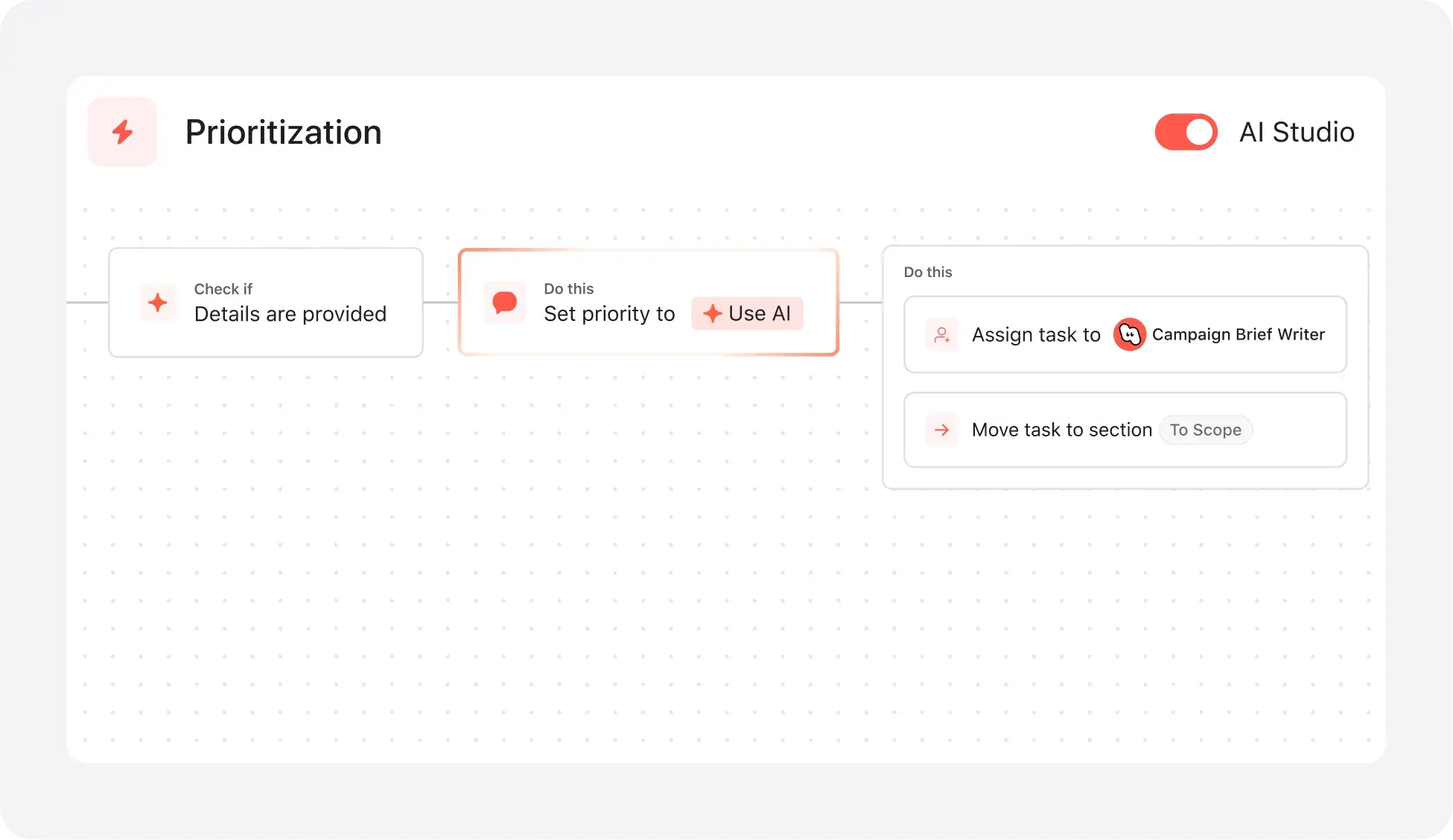
AI your whole team can actually use
Asana AI Teammates understand your goals, projects, and dependencies from day one—Jira’s AI is siloed within technical tickets, missing the cross-functional context of your business goals.
Asana AI Teammates build shared memory that compounds across your whole team—Atlassian Intelligence focuses on summarizing issues rather than maintaining a persistent "brain" for your organization.
Every AI action is visible in your activity log, just like a human teammate—Jira often attributes AI suggestions to the user who accepted them, creating accountability gaps.
Simple project & workflow tools for everyone
With Asana, users can launch new projects in minutes by choosing from multiple project views and applying templates that match their workflow—no IT support needed.
Clear, visual task assignments, due dates, and project milestones are accessible to all team members in Asana, making it easy to track progress and collaborate in real time.
Jira’s project creation and workflow customization are optimized for technical teams, often requiring more setup and technical expertise, whereas Asana supports broad adoption by non-technical users with in-product guidance and intuitive templates.
Connect 400+ integrations for scalable workflows
Asana 可與 400 多個應用程式連結,包括 Slack、Google Workspace、Salesforce 和 Tableau,讓團隊能夠將交接工作自動化,並將工作集中管理於同一處。
團隊將 Asana 連結至行銷、分析和 IT 工具,從而減少手動更新的次數,並確保工作內容保持同步。
Jira’s application ecosystem is more technical, often requiring advanced configuration, while Asana provides business-optimized integrations that are easy to set up and automate without IT support.
Personalize with custom fields and templates
Asana 可讓各種規模的團隊在任何專案中新增無限制的自訂欄位,例如優先順序、階段或管道,以便追蹤並以視覺化方式組織任務。
在 Asana 中,團隊可以立即對任務進行顏色編碼、篩選及排序,讓每個專案的管理都變得清晰且可據以行動。
Jira relies on more technical configuration for customization, while Asana provides personalization with reusable custom fields and templates that keep workflows consistent across projects.
Collaborate with integrated conversations & files
Asana 透過原生任務評論、專案訊息和結構化狀態更新,將所有專案溝通整合在一起,因此團隊可以即時進行協作,而無需在工具之間切換。
檔案、回饋和對話會直接連結至任務和專案,讓您輕鬆追蹤進度、釐清後續步驟,並確保每個人都能保持資訊同步,即使團隊擴大或跨部門合作也是如此。
Jira often requires integration with other Atlassian tools or add-ons for broader collaboration, while Asana provides built-in communication features and direct integrations with Slack and Google Drive to centralize teamwork.




常見問題
How easy is it for my team to switch from Jira to Asana?
What resources are available for training and ongoing support?
How does Asana handle onboarding for mixed technical and business teams?
Can I import my existing projects and data into Asana?
How does Asana help teams get up to speed quickly?
與 85% 的《財星》百大企業為伍,共同使用 Asana**
**準確性僅至 2025 年 12 月,包括免費和付費使用者。